I've put together a great list of KidLit people on Twitter, and I highly recommend you subscribe if you want to see the latest tweets by writers and illustrators with just a click.
Here it is!
https://twitter.com/SheviStories/lists/cb-and-ya-people
It's a great list full of great stuff. Hope to see you there.
Love,
Shevi

I Write Words for Nerds
Showing posts with label illustrators. Show all posts
Showing posts with label illustrators. Show all posts
Tuesday, April 12, 2016


Sunday, December 06, 2015
Why I'm Quitting the SCBWI (Even Though I Think It's Great)
I'm planning to quit the SCBWI when my annual membership runs out in February.
I've loved the organization. At one time I had over 10,000 posts and comments on the SCBWI boards. I've written for the SCBWI Bulletin, illustrated for it, too. I've won a monthly SCBWI writing competition. I even put together the SCBWI Illustrator's Market Guide under Harold Underdown, which was difficult but rewarding. I've enjoyed attending SCBWI conferences and workshops, particularly in New Jersey, and I love the critique group I helped assemble through the SCBWI boards. In the past, the SCBWI was great for me.

Over the last couple of years, though, I feel like everything SCBWI related has been moving me backward, instead of forward, and like all of us, I need to keep moving forward.
When the SCBWI boards changed hosts, all my old posts and comments--all the help and encouragement I'd provided to other SCBWI members over the years--pretty much vanished, and I started again from zero.
The new boards weren't easy to use, and fewer people used them, mostly to try to promote their own work. The sense of camaraderie--of fellow writers and illustrators supporting each other on this journey--vanished. I no longer felt like I belonged there.
Then the SCBWI started PAL (Published And Listed) membership, which I applied for. Twice. However, since my traditional credits are for illustrations, articles, stories, and other works in newspapers and magazines, I apparently don't qualify, although no one from the SCBWI thought to inform me of that. I put in my request and received no response at all. It now says that PAL status is only awarded to those who have published books with traditional publishers. Over 12 years of publishing history and all the work I've done for the SCBWI doesn't count for beans.
I've been building sandcastles, and they've been washed away. I've seen this happen to others, too. I've seen a SCBWI RA (Regional Advisor) pretty much work her butt off for the organization, and while I can't speak for her, I do feel she hasn't been rewarded for all that she's done.
All of this makes me sad.
I don't feel that my time has been wasted. I've learned a lot, things I'm putting into practice now as an indie publisher. I've made some great friends. But the truth is I probably should have left the SCBWI a few years ago.
I make it a rule in life to occasionally stop and ask myself, "Why am I doing this? Why did I start this, and am I getting what I thought I would out of this? Is there a better use of my time and energy?" When it comes to the SCBWI right now, the answers are "I don't know why I'm doing this anymore. I started this because I wanted to find an agent and a publisher, but I don't want to do either of those things anymore. My time, energy and other resources would be better spent elsewhere."
I still think the SCBWI is a great organization for anyone new to writing and illustrating for children, or for anyone who has already had a book traditionally published. Unfortunately (or perhaps fortunately), that's not me.
I've loved the organization. At one time I had over 10,000 posts and comments on the SCBWI boards. I've written for the SCBWI Bulletin, illustrated for it, too. I've won a monthly SCBWI writing competition. I even put together the SCBWI Illustrator's Market Guide under Harold Underdown, which was difficult but rewarding. I've enjoyed attending SCBWI conferences and workshops, particularly in New Jersey, and I love the critique group I helped assemble through the SCBWI boards. In the past, the SCBWI was great for me.
Over the last couple of years, though, I feel like everything SCBWI related has been moving me backward, instead of forward, and like all of us, I need to keep moving forward.
When the SCBWI boards changed hosts, all my old posts and comments--all the help and encouragement I'd provided to other SCBWI members over the years--pretty much vanished, and I started again from zero.
The new boards weren't easy to use, and fewer people used them, mostly to try to promote their own work. The sense of camaraderie--of fellow writers and illustrators supporting each other on this journey--vanished. I no longer felt like I belonged there.
Then the SCBWI started PAL (Published And Listed) membership, which I applied for. Twice. However, since my traditional credits are for illustrations, articles, stories, and other works in newspapers and magazines, I apparently don't qualify, although no one from the SCBWI thought to inform me of that. I put in my request and received no response at all. It now says that PAL status is only awarded to those who have published books with traditional publishers. Over 12 years of publishing history and all the work I've done for the SCBWI doesn't count for beans.
I've been building sandcastles, and they've been washed away. I've seen this happen to others, too. I've seen a SCBWI RA (Regional Advisor) pretty much work her butt off for the organization, and while I can't speak for her, I do feel she hasn't been rewarded for all that she's done.
All of this makes me sad.
I don't feel that my time has been wasted. I've learned a lot, things I'm putting into practice now as an indie publisher. I've made some great friends. But the truth is I probably should have left the SCBWI a few years ago.
I make it a rule in life to occasionally stop and ask myself, "Why am I doing this? Why did I start this, and am I getting what I thought I would out of this? Is there a better use of my time and energy?" When it comes to the SCBWI right now, the answers are "I don't know why I'm doing this anymore. I started this because I wanted to find an agent and a publisher, but I don't want to do either of those things anymore. My time, energy and other resources would be better spent elsewhere."
I still think the SCBWI is a great organization for anyone new to writing and illustrating for children, or for anyone who has already had a book traditionally published. Unfortunately (or perhaps fortunately), that's not me.
Friday, April 20, 2012
Pinterest for writers and illustrators, part two--Pinterest and copyrights
I'm seeing a lot of comments on the web from writers, illustrators and other artists who are scared about Pinterest when it comes to copyright violation. Let me put your minds at ease.

Pinterest users don't "steal" pins. Each pin leads back to its origin. That makes it free advertising. Why post something on your blog if you don't want people to view it? Why offer a poster for sale if you don't want someone to buy it? Why offer a book on Amazon if you don't want people to know about it and buy it? Pinterest can only help creative people. It gives Pinterest users a chance to say, "I love this. You should check this out." Why would creative people fight against that? If you really don't want people to know or talk about your work, you shouldn't publish it on your blog or anywhere else.
Pinterest only lets you pin things from public places on the web. You can't, for example, pin something from Facebook, because that might be private. But what if you're not the person who made your work public? What if someone stole it and posted it to his blog without permission? If so, your problem is with the original blogger, not with Pinterest. If anything, Pinterest might make it easier to find that blogger, because the pin will lead back to his blog.
In short, Pinterest is only a good thing for creative people, particularly visual artists. It makes it easier for people to not only talk about your work and discover it but to immediately access your blog or a place on the web where they can purchase your work.

Pinterest users don't "steal" pins. Each pin leads back to its origin. That makes it free advertising. Why post something on your blog if you don't want people to view it? Why offer a poster for sale if you don't want someone to buy it? Why offer a book on Amazon if you don't want people to know about it and buy it? Pinterest can only help creative people. It gives Pinterest users a chance to say, "I love this. You should check this out." Why would creative people fight against that? If you really don't want people to know or talk about your work, you shouldn't publish it on your blog or anywhere else.
Pinterest only lets you pin things from public places on the web. You can't, for example, pin something from Facebook, because that might be private. But what if you're not the person who made your work public? What if someone stole it and posted it to his blog without permission? If so, your problem is with the original blogger, not with Pinterest. If anything, Pinterest might make it easier to find that blogger, because the pin will lead back to his blog.
In short, Pinterest is only a good thing for creative people, particularly visual artists. It makes it easier for people to not only talk about your work and discover it but to immediately access your blog or a place on the web where they can purchase your work.
Wednesday, April 18, 2012
What Pinterest Has to Offer Writers and Illustrators
I like Pinterest. It's visual, girly and intuitive, which works very well for me. A lot of my fellow writers and illustrators, though, want to know what Pinterest has to offer them. They're already spread thin with Facebook, Twitter, and Google+. Why join another social media outlet?
Pinterest has so much to offer if you use it right. I'll get to that in a moment, but first I need to explain what Pinterest is and who uses it.
Pinterest is used mostly by girls and women, and their main interests are shopping; beautiful things, people, and places; pop culture; and cooking, design and D.I.Y. projects.
Pinterest is a visual cross between Twitter and Facebook. Like Facebook, you can share, like and comment on images, and you can see the comments others have made. Like Twitter, you don't have to follow someone to see their posts or their boards, and there's a search engine that lets you find images by topic. Another thing, unfortunately, that has carried over from Twitter and Facebook is spam. You just can't escape it nowadays. Pinterest is in its beta stage right now, so the only way to join is to get an invitation, which is easy to do through your Twitter and Facebook friends. Once you join, Pinterest will ask you if you want to follow the boards of your Facebook or Twitter friends, which is an easy way to find things you want to repin (provided your friends have the same interests).
Pinterest also has categories of topics. "Geek," for example, is one of my favorite topics. Some people like to have boards that are all based around one color. I have a board that's only on chocolate. I find images for it by searching for chocolate, although sometimes I'll search websites for chocolate and pin images from them. Since I'm interested in writing, books, and cover design, I also have boards on those topics.
Here's a link to all of my boards in Pinterest: http://pinterest.com/shevistories/

People can follow individual boards. They don't have to follow all of a person's boards. There are some people, for example, who only follow my Chocolate Love board. If you're a writer, I suggest you follow my On Writing and Dream boards. I think you'll find them inspirational. Designers might be interested in my board on Well Designed Book Covers.
So how have I seen writers and illustrators use Pinterest?
In short, Pinterest is another way--a visual way--to connect with readers and colleagues. It's girly, which tends to make it nicer, but there's also a popularity aspect.
If you want people to go to your blog, post the image first on your blog and then pin it on a board in Pinterest.
If your book is on sale, make sure to to pin the image of the cover from the store where it can be bought at a lower price.
But above all, don't act like a spammer. Act like a real person who truly likes the same things Pinterest users like. Create a lot of boards, so Pinterest users can get a sense of who you are and why they might like to read your books.
What about you? Are you using Pinterest? If so, what do you like to pin and repin? If not, why not? I'd love to hear from you, so please post your thoughts on Pinterest below.
Pinterest has so much to offer if you use it right. I'll get to that in a moment, but first I need to explain what Pinterest is and who uses it.
Pinterest is used mostly by girls and women, and their main interests are shopping; beautiful things, people, and places; pop culture; and cooking, design and D.I.Y. projects.
Pinterest is a visual cross between Twitter and Facebook. Like Facebook, you can share, like and comment on images, and you can see the comments others have made. Like Twitter, you don't have to follow someone to see their posts or their boards, and there's a search engine that lets you find images by topic. Another thing, unfortunately, that has carried over from Twitter and Facebook is spam. You just can't escape it nowadays. Pinterest is in its beta stage right now, so the only way to join is to get an invitation, which is easy to do through your Twitter and Facebook friends. Once you join, Pinterest will ask you if you want to follow the boards of your Facebook or Twitter friends, which is an easy way to find things you want to repin (provided your friends have the same interests).
Pinterest also has categories of topics. "Geek," for example, is one of my favorite topics. Some people like to have boards that are all based around one color. I have a board that's only on chocolate. I find images for it by searching for chocolate, although sometimes I'll search websites for chocolate and pin images from them. Since I'm interested in writing, books, and cover design, I also have boards on those topics.
Here's a link to all of my boards in Pinterest: http://pinterest.com/shevistories/

People can follow individual boards. They don't have to follow all of a person's boards. There are some people, for example, who only follow my Chocolate Love board. If you're a writer, I suggest you follow my On Writing and Dream boards. I think you'll find them inspirational. Designers might be interested in my board on Well Designed Book Covers.
So how have I seen writers and illustrators use Pinterest?
- First, keep a board on books in your genre to attract readers of your genre. If you write dystopian, for example, posting your book next to a lot of pictures of The Hunger Games is not a bad idea. Post your book's cover and write a little about your book, using keywords to make it easy for Pinterest's search engine to find it.
- Also announce if your book is on sale (remember that shopping is a major interest in Pinterest). Keep boards of things you find interesting, inspirational, and so on. Perhaps others will find them interesting and inspirational too.
- Follow the boards of your followers that you find interesting.
- Comments on images you find interesting, but please don't spam or overtly self-promote.
- Some writers like to post images of actors and places that fit their book or WIP. I have a board of images connected to Ride of Your Life. It's not a very popular board, but who knows? Maybe it will attract people in the summer when they're looking for amusement parks and roller coasters.
In short, Pinterest is another way--a visual way--to connect with readers and colleagues. It's girly, which tends to make it nicer, but there's also a popularity aspect.
 |
| Like me, tweet me, share me, PIN ME! |
If you want people to go to your blog, post the image first on your blog and then pin it on a board in Pinterest.
If your book is on sale, make sure to to pin the image of the cover from the store where it can be bought at a lower price.
But above all, don't act like a spammer. Act like a real person who truly likes the same things Pinterest users like. Create a lot of boards, so Pinterest users can get a sense of who you are and why they might like to read your books.
What about you? Are you using Pinterest? If so, what do you like to pin and repin? If not, why not? I'd love to hear from you, so please post your thoughts on Pinterest below.
Thursday, May 05, 2011
"Where do illustrations come from?"
It might seem like magic, but it's not. Illustrating is a process, very much like writing. There are many ways to do it. Here's one of them:
1. Find a scene in the text to illustrate. I decided to add one illustration to every chapter in Dan Quixote, so I went through the book and copied and pasted scenes I thought would make good illustrations into a single file. Sometimes I picked more than one scene in a chapter, so I could change my mind later.
2. Draw character sketches. This helps make it easier to be consistent when you're drawing more than one illustration with the same character. It's even better if you can draw the same character in different poses. Find places in the text where the character is described, so the drawing fits the words. With Dan Quixote, I drew the cover first. This showed me what all the main characters looked like.
 3. Start sketching thumbnails of the scene. Make these the simplest of outlines, with stick figures and so on Try to look at it from different angles. Work out the vanishing point or points. Don't settle for the first thumbnail, because the next one or the one after that could be even better. Here are two thumbnail sketches for one of the illustrations in this book.
 I chose to use the angle at the top left, because it seemed more playful and open. The characters' world seems to go on forever, which is what I want for this scene, that sense of endless possibility.
4. Make an enlarged copy of your chosen thumbnail sketch, either by hand or with a copier. I used my multifunction printer.
 I then used an improvised "lightbox" (in this case, placing the copy on a window in daylight and placing a piece of drawing paper over it) to trace the outline of that enlarged copy.
5. Start to sketch in the details. You'll note it says "night sky" where the sky is meant to go. I often mark large spaces that will be colored in black with an X. Draw in guidelines (for example, where the edge of the picnic table is hidden by the characters' legs), skeletal lines and so on.

6. Ask yourself if you're happy with it. If not, why not, and what can you do to fix it? I soon realized the important elements in this drawing were still too small, so I enlarged this drawing too.

7. Add the finishing touches, Play around with texture. This is all in pencil, so nothing is final until it's inked. Even then there are ways to fix mistakes, but it's easier at this stage. When you're satisfied, ink the lines you want to use while ignoring the ones you don't. Erase the pencil outline. Now scan your drawing, and unless you see something that still needs changing, you're done! Here's the finished drawing.
 You might notice there are some significant differences between the preliminary sketches and the final one. I relocated the trees on the right, and Sandy's feet are closer to her body. You notice things at each stage you want to fix. (Actually, I just noticed the arm Dan is leaning on should be longer. Oh, well, too late to change that now.)
8. Make last minute corrections. Computers can make this a lot easier provided you have the right software and hardware. I use Corel PhotoPaint (which is a part of CorelDraw), and I like it, but I haven't got used to using a tablet, and working with a mouse is even worse. That's why I'd rather do my sketches by hand and scan them in. Maybe one day I'll be able to afford a Cintiq tablet or a touch-screen computer, so I can see what I'm doing while I'm doing it.
And that's it. The most important thing to remember is to have fun.
1. Find a scene in the text to illustrate. I decided to add one illustration to every chapter in Dan Quixote, so I went through the book and copied and pasted scenes I thought would make good illustrations into a single file. Sometimes I picked more than one scene in a chapter, so I could change my mind later.
2. Draw character sketches. This helps make it easier to be consistent when you're drawing more than one illustration with the same character. It's even better if you can draw the same character in different poses. Find places in the text where the character is described, so the drawing fits the words. With Dan Quixote, I drew the cover first. This showed me what all the main characters looked like.


4. Make an enlarged copy of your chosen thumbnail sketch, either by hand or with a copier. I used my multifunction printer.

5. Start to sketch in the details. You'll note it says "night sky" where the sky is meant to go. I often mark large spaces that will be colored in black with an X. Draw in guidelines (for example, where the edge of the picnic table is hidden by the characters' legs), skeletal lines and so on.
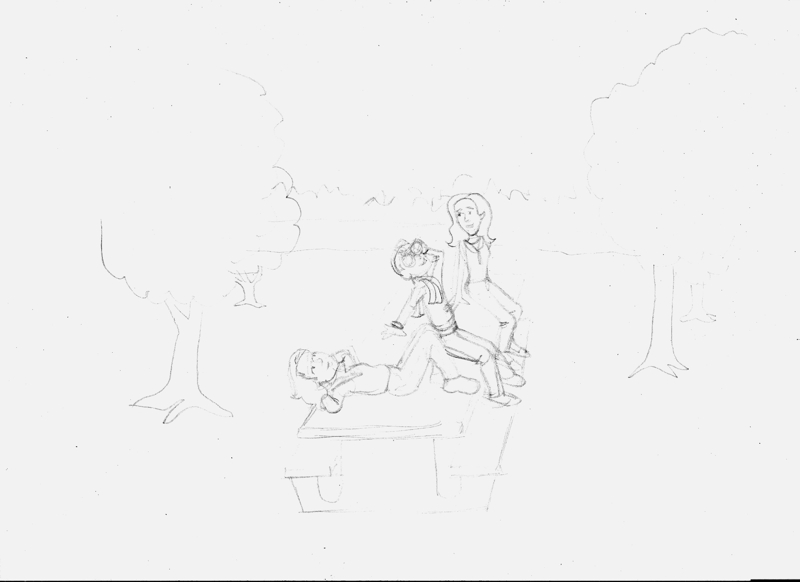
6. Ask yourself if you're happy with it. If not, why not, and what can you do to fix it? I soon realized the important elements in this drawing were still too small, so I enlarged this drawing too.

7. Add the finishing touches, Play around with texture. This is all in pencil, so nothing is final until it's inked. Even then there are ways to fix mistakes, but it's easier at this stage. When you're satisfied, ink the lines you want to use while ignoring the ones you don't. Erase the pencil outline. Now scan your drawing, and unless you see something that still needs changing, you're done! Here's the finished drawing.

8. Make last minute corrections. Computers can make this a lot easier provided you have the right software and hardware. I use Corel PhotoPaint (which is a part of CorelDraw), and I like it, but I haven't got used to using a tablet, and working with a mouse is even worse. That's why I'd rather do my sketches by hand and scan them in. Maybe one day I'll be able to afford a Cintiq tablet or a touch-screen computer, so I can see what I'm doing while I'm doing it.
And that's it. The most important thing to remember is to have fun.
Subscribe to:
Posts (Atom)